
Altium Designer Agile
3.11 GB
26.5.0 build 17
Windows x64
Description
Altium Designer Agile Overview
Altium Designer Agile is a platform solution for the development of electronic products and systems that connects users and engineering environments through integration with tools such as Jira, enterprise PLM systems, SiliconExpert, and Z2Data. The solution provides structure, management, and control over processes related to people, tools, data, and workflows, while maintaining the speed and agility required for electronics development.
Altium Designer Agile Features
- Seamless integration with Agile PLM systems for efficient data management
- Real-time synchronization between Altium Designer and Agile databases
- Automated version control to maintain accurate design revisions
- Centralized management of design files, components, and documentation
- Secure data sharing across engineering and manufacturing teams
- Streamlined engineering change order (ECO) process within the Agile environment
- Enhanced traceability of design history and product lifecycle data
- Simplified BOM (Bill of Materials) management with Agile connectivity
- Reduced design errors through consistent and verified component data
- Improved collaboration between design, production, and supply chain teams
- Support for compliance and audit-ready documentation
- Accelerated product development through integrated workflows
- Scalable architecture suitable for enterprise-level design teams
- Efficient project tracking and approval processes via Agile integration
- Minimized manual data entry with automated synchronization features
Installation
I created a license by combining all the strings found from the previous and previously posted versions (the most recent version is missing the strings for SolidWorks and Harness Design). Harness Design should also activate. I set the expiration date to December 31, 2029.
In general, the highlighted lines (and especially the GUIDs, it would be good) can be changed at your discretion.
Download the .alf file and shfolder.dll: Download the .alf file and shfolder.dll (Pixeldrain)
shfolder.dll is taken from the distribution. Place it in %ProgramFiles%AltiumAD23 (next to X2.exe ).
In Altium Designer versions higher than 23.8, the license is added as follows:
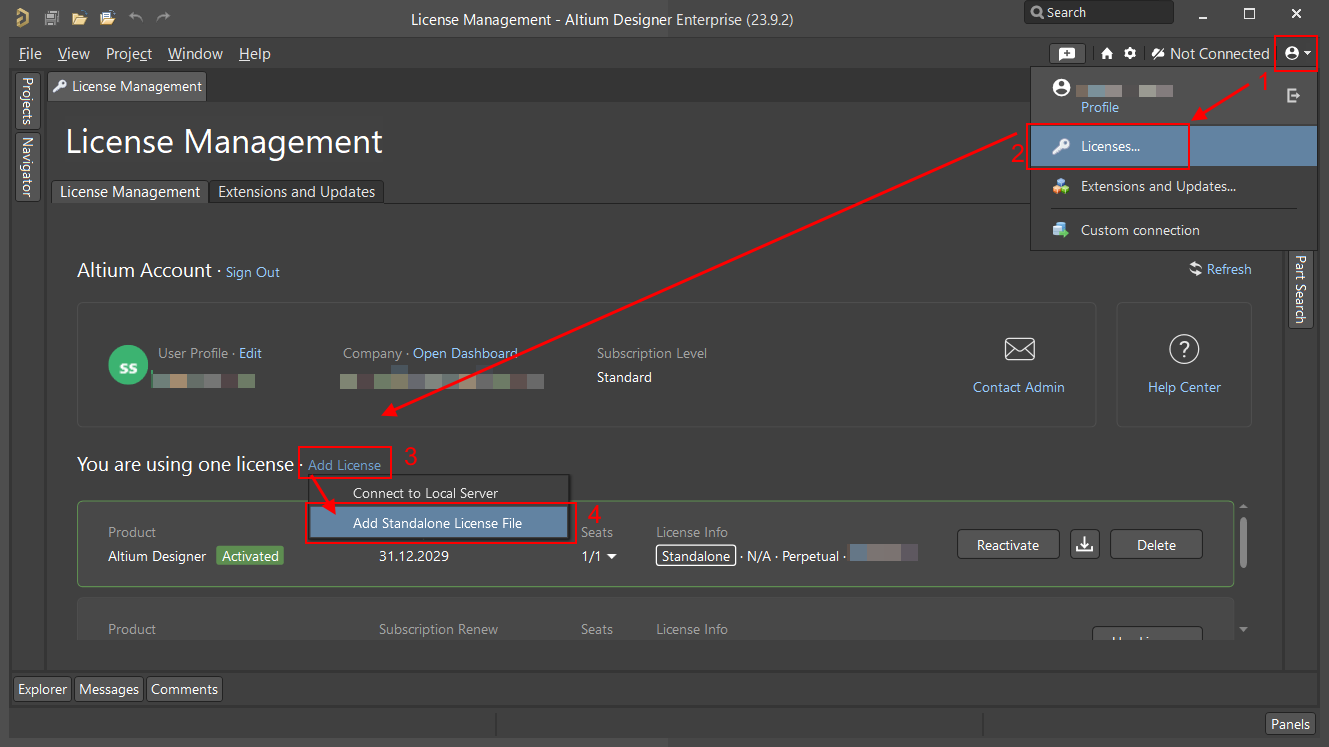
It’s simple.
1. Download this distribution (In previous versions, everything was exactly the same. I hope nothing will change in the future.).
2. Unpack the zip or iso to your disk (both installers are identical, so you can download only one of them).
3. Before installation, it is advisable to remove the Read-only attribute from all unpacked files.
4. Run the installer Installer.Exe and follow the wizard instructions.
5. Wait for the installation to complete.
6. Unpack the Lic.rar file with licenses, which is located in the OfflineSetup_Lic folder.
7. From it, copy the shfolder.dll file to the folder where you installed AD (by default, c:Program FilesAltiumAD26).
8. Run Altium Designer. Select the Help -> About… menu and click License Management.
9. Add any license from the already unpacked ones (file with the .alf extension). How to add a license, see the image above.
10. Now you can get to work and install additional extensions from the Extensions and Updates tab.
Notes
When downloading full offline installers from torrents, ensure that the “Read-Only” attribute is cleared for all installation files . If necessary, clear it. Otherwise, installation issues will occur.
The same applies to the “Downloaded from Internet” attribute on all zip files in the Extensions folder.
Also, remove the “Read-Only” attribute from the DXP.exe file in the installation folder (if the “Please close Altium Designer to continue ” dialog appears during installation/uninstallation ).
File Information
Year/Release Date : 2025
Version : 26.2.0 build 28
Developer : Altium
Developer’s website : www.altium.com
Bit depth : 64bit
Interface language : English
Tablet : present
System Requirements
Windows 11 (64-bit only) or Windows 10 (64-bit only)
Notes: Windows 8.1 (64-bit only) and Windows 7 SP1 (64-bit only) are still supported, although not recommended.
Intel® Core™ i7 (or later) processor or equivalent
16 GB RAM
10 GB hard disk space (Install + User Files)
SSD
High-performance graphics card (fully supporting DirectX 11 or better), such as GeForce GTX 1060/Radeon RX 470
Dual monitors with 2560×1440 (or better) screen resolution
3D mouse for 3D PCB design, such as the SpaceMouse®
Adobe® Reader® (version XI or later for 3D PDF viewing)
Up to date Web browser
Microsoft Office 32-bit or 64-bit (Microsoft Excel required for BOM, Microsoft Access required for DbLibs). 64-bit Microsoft Access Database Engine 2016 (required for DbLibs) – this is included in Microsoft Office 64-bit, but not included in Microsoft Office 32-bit.
Versions
| Version | Size | Requirements | Date |
|---|---|---|---|
| 26.7.1 build 25 | 3.14 GB | Windows x64 | 13/06/2026 |
| 26.2.0 build 28 | 3.23 GB | Windows x64 | 15/01/2026 |
| 26.0.0 build 14 | 5.93 GB | Windows x64 | 04/10/2025 |




